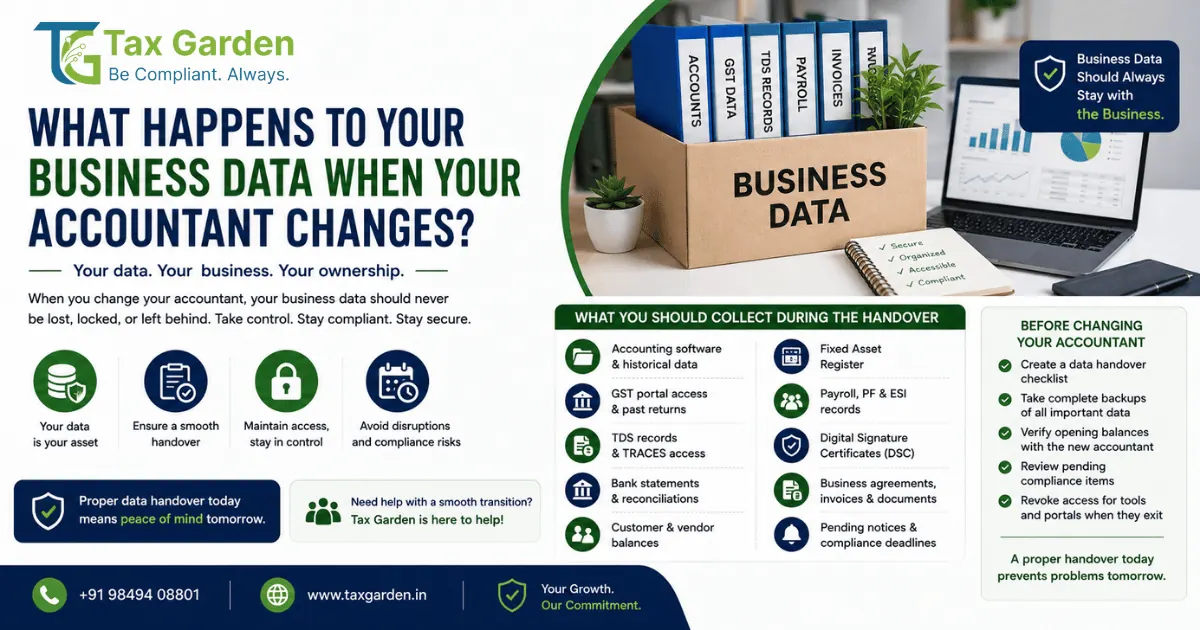
Your accountant leaves. It happens. People change jobs, retire, or move on. But what happens to your business data when they do?
For most small and medium businesses in India, the answer is: chaos.
You realize that your GST login credentials were saved only on the accountant's laptop. Your TDS records are in a folder on their desktop. Your accounting software is licensed under their email. Your digital signature token is in their drawer. And you have no idea what compliance filings are pending.
This is not just an inconvenience; it is a business risk. This guide covers everything that happens to your business data when your accountant changes, and how to ensure your financial data stays business-owned.
Looking for expert help with business data ownership, accountant transition, GST data transfer, TDS records, bank reconciliation, fixed assets register, payroll history, digital signature ownership, pending compliance? The team at Tax Garden, based in Kondapur, Hyderabad, helps Indian SMEs stay compliant. End-to-end filings, notices, and deadline tracking, all in one place.
The Problem: Accountant-Dependent Data
Most SMEs operate with accountant-dependent data: financial records, portal logins, and compliance files that exist only on the accountant's systems.
Here is how it typically works:
| Aspect | Accountant-Dependent | Business-Owned |
|---|---|---|
| Accounting Software | Installed on accountant's computer | Installed on business server or cloud |
| GST Login | Accountant knows the password; business does not | Business has primary login; accountant has delegated access |
| TDS Records | Stored in accountant's files | Stored in business accounting system |
| Digital Signature | Token with accountant | Token with business owner or authorised director |
| Compliance Calendar | In accountant's head | Documented and shared with business |
| Financial Data | On accountant's hard drive | In business-owned cloud or server |
The Risk: When the accountant leaves, the data leaves with them.
Why Portal Control Matters
Everything filed from your GSTIN, PAN or TAN is legally your filing, whoever pressed the submit button. If someone else controls the login, they can file or change returns in your name, and any tax, interest and penalty that follows is raised on your business. When you do not own your data and logins, you carry that risk.
What Happens to Your Data When Your Accountant Changes?
Here is a comprehensive breakdown of what happens to each critical data category:
1. Previous Accounting Software and Data
The Problem: Most SMEs use accounting software like Tally, Busy, Zoho Books, or QuickBooks. If the software is installed on the accountant's computer, you lose access when they leave.
Busy to Tally Data Transfer: Migrating data from Busy Accounting Software to TallyPrime requires careful planning due to differences in data structure, formats, and ledgers between the two systems. There is no direct one-click migration; data must be exported via XML or Excel and mapped to the new system.
What You Should Do:
- Ensure the accounting software is business-licensed (not under the accountant's name)
- Keep a backup of the entire company data file
- Use cloud-based accounting software for remote access
- If migrating from Busy to Tally, use third-party migration tools or custom utilities
2. GST Data and Portal Access
The Problem: Your GST portal login credentials may be known only to your accountant. When they leave, you may be locked out.
GST Login Ownership: The GST login belongs to the registered person and is recovered through the primary authorised signatory's registered mobile number and email. The business must keep primary ownership of the login and of those contact details.
Key Risks:
- If your accountant changes the password and does not share it, you lose access
- Filed GSTR-1, GSTR-3B and GSTR-9 returns stay on the portal, but the working files, reconciliations and downloaded copies may exist only on their system
- From the July 2025 tax period, the liability in Table 3 of GSTR-3B is auto-populated from GSTR-1/1A/IFF and cannot be edited in GSTR-3B (GSTN Advisory, 7 June 2025), so errors made in GSTR-1 by whoever files it flow straight into your tax payment and can only be corrected through GSTR-1A or later GSTR-1s
What You Should Do:
- Register as the primary user on the GST portal with your own credentials
- Engage your accountant as a GST Practitioner from your own login (Services > User Services > Engage / Disengage GST Practitioner), so they work under their own credentials
- Maintain a separate record of all GST filings and payment challans
- Never share your GST login password; disengage the practitioner when the engagement ends
3. TDS Records and TRACES Portal Access
The Problem: TDS records, including TDS certificates (Form 16 and Form 16A up to FY 2025-26; Form 16A is Form 131 from 1 April 2026) and TDS return filings, are often managed solely by the accountant.
TDS Records Ownership: TDS you deduct is reported and deposited under your business's TAN, and TDS deducted from you appears against your PAN in Form 26AS and AIS. The records belong to your business, not your accountant.
TRACES Portal: TRACES is used to download TDS certificates, view statement status and defaults, and file correction requests.
What You Should Do:
- Ensure your business has its own login to the TRACES portal
- Keep copies of all TDS returns (Forms 24Q, 26Q and 27Q up to FY 2025-26; Forms 138 and 140 replace 24Q and 26Q from 1 April 2026)
- Maintain a register of TDS deducted and deposited
- Update the responsible person's details for your TAN when that person changes, so notices and certificates reach the business
4. Bank Reconciliation
The Problem: Bank reconciliation (matching bank statements with accounting records) is often done by the accountant. When they leave, unreconciled entries may remain.
Key Risks:
- Outstanding cheques, unpresented cheques, and dishonoured cheques may not be tracked
- Reconciliation errors can lead to incorrect financial statements
What You Should Do:
- Ensure bank reconciliation is done monthly, not annually
- Maintain a reconciliation statement for each bank account
- Keep copies of all bank statements (download them regularly)
- Use accounting software that automates reconciliation
5. Customer and Vendor Balances
The Problem: Accounts receivable (what customers owe you) and accounts payable (what you owe vendors) are often tracked only in the accountant's system.
What You Should Do:
- Run aging reports for accounts receivable and payable monthly
- Maintain a customer and vendor master in your accounting system
- Keep copies of all invoices and purchase orders
- Ensure the new accountant receives a full list of outstanding balances
6. Fixed-Asset Records
The Problem: Fixed assets (computers, vehicles, machinery, furniture) are recorded in a Fixed Asset Register (FAR). This register is often maintained by the accountant.
What You Should Do:
- Maintain a Fixed Asset Register in your accounting system
- Record all asset additions, disposals, and depreciation
- Keep purchase invoices and warranty documents for each asset
- Ensure FAR-GL reconciliation is performed regularly
7. Payroll History
The Problem: Payroll records, employee tax deductions, PF/ESI filings, and Form 16s are often managed by the accountant.
What You Should Do:
- Maintain a payroll register with all employee details
- Keep copies of all PF and ESI challans
- Ensure Form 16 is issued to all employees annually
- Maintain employee service history and salary records
8. Login and Access Ownership
The Problem: Your accountant may have login credentials to multiple portals on your behalf.
What You Should Do:
- Maintain a central register of all portal logins:
- GST Portal (gst.gov.in)
- Income Tax e-Filing Portal (incometax.gov.in)
- TRACES Portal (tdscpc.gov.in)
- EPFO Portal
- ESIC Portal
- Accounting Software
- Use a password manager with shared access
- Change passwords when the accountant leaves
- Revoke delegated access for the departing accountant
9. Digital Signatures
The Problem: Digital Signature Certificates (DSCs) are used to sign GST returns (mandatory for companies and LLPs), income tax returns and audit reports, and ROC filings. Often, the DSC token is in the accountant's possession.
Digital Signature Ownership: The DSC is issued to a specific individual (the proprietor, partner, director or authorised signatory). Documents signed with it are treated as signed by that certificate holder, whoever physically used the token.
DSC Types and Costs:
- Class 3 DSC is the class now issued for individual signing (Class 2 was discontinued by the Controller of Certifying Authorities from 1 January 2021)
- Prices vary by certifying authority, validity period (usually 1 to 3 years) and whether a USB token is included, so compare quotes from licensed certifying authorities
What You Should Do:
- Ensure the DSC is issued to the proprietor, partner or director who signs, not the accountant
- Keep the DSC token physically with the business
- Never share your DSC password with anyone
- Revoke the DSC if it is lost or compromised
10. Documents and Agreements
The Problem: Contracts, agreements, invoices, and other critical documents may be stored only on the accountant's system.
What You Should Do:
- Maintain a central document repository (Google Drive, Dropbox, etc.)
- Store all contracts, agreements, and invoices in the repository
- Keep a contract register with key dates (renewal, termination, payment terms)
- Ensure the repository is accessible to the business owner and authorised team members
11. Pending Compliance Issues
The Problem: When an accountant leaves, pending compliance issues (unfiled returns, outstanding notices, or pending assessments) may be overlooked.
What You Should Do:
- Maintain a compliance calendar with all due dates:
- GST returns (GSTR-1, GSTR-3B, GSTR-9)
- Income Tax returns (ITR)
- TDS returns (24Q, 26Q, 27Q up to FY 2025-26; 138, 140 from 1 April 2026)
- ROC filings (AOC-4, MGT-7 or MGT-7A)
- Advance tax installments
- Conduct a compliance audit when the accountant changes
- Respond to any pending notices from the Income Tax Department or GST authorities
How Long the Law Requires You to Keep Records
The duty to keep books sits with the business, so the records must survive any change of accountant:
| Law | What must be kept | How long |
|---|---|---|
| Income-tax (s.44AA of the 1961 Act; s.62 of the Income-tax Act, 2025 from 1 April 2026) | Books of account and documents | Rule 6F: six years from the end of the relevant assessment year for specified professionals; keep other business books at least until the reassessment window for that year closes |
| GST (s.35 and s.36 CGST Act) | Accounts, invoices and records at the principal place of business | 72 months from the due date of the annual return for that year, longer if an appeal, revision or investigation is pending |
| Companies Act, 2013 (s.128(5)) | Books of account and vouchers | Eight financial years immediately preceding the current year |
Companies keeping books electronically must also use accounting software with an audit trail that cannot be disabled (Rule 3(1), Companies (Accounts) Rules, 2014, from 1 April 2023) and keep a daily backup on servers physically located in India (Rule 3(5), from August 2022). A company whose books sit only on an outside accountant's laptop does not meet either rule.
Business-Owned vs Accountant-Dependent Data
The concept of business-owned financial data is simple: your data should be accessible, transferable, and secure, regardless of who your accountant is.
Business-Owned Data
| Characteristic | Description |
|---|---|
| Accessible | The business owner can access all financial data at any time |
| Transferable | Data can be easily transferred to a new accountant |
| Secure | Data is backed up and protected from loss or unauthorised access |
| Owned | The business has legal and practical control over its data |
Accountant-Dependent Data
| Characteristic | Description |
|---|---|
| Locked | Only the accountant can access the data |
| Non-Transferable | Data is in a format or system that cannot be easily transferred |
| Insecure | Data is stored only on the accountant's computer with no backup |
| Controlled | The accountant controls access and ownership |
How to Move from Accountant-Dependent to Business-Owned
| Step | Action |
|---|---|
| 1 | Use cloud-based accounting software (Zoho Books, QuickBooks, TallyPrime Cloud) |
| 2 | Keep primary login credentials for all portals |
| 3 | Maintain regular backups of all financial data |
| 4 | Document all compliance deadlines in a shared calendar |
| 5 | Keep digital signatures in business custody |
| 6 | Conduct monthly reconciliations yourself or with your team |
| 7 | Run regular reports (P&L, Balance Sheet, Aging) even if the accountant manages them |
The Financial Handover Checklist
When changing accountants, use this checklist to ensure a smooth transition:
Pre-Transition
- Identify all portals where the accountant has access
- Identify all software used by the accountant
- Identify all pending compliance items
- Back up all financial data
During Transition
- Request secure transfer of all financial records and historical data
- Conduct a handover meeting with both old and new accountants
- Transfer accounting software access to the new accountant
- Transfer portal access to the new accountant
- Transfer digital signature to the new accountant (or keep it with the business)
- Transfer payroll records, employee tax deductions, and PF/ESI filings
Post-Transition
- Verify opening balances with the new accountant
- Run trial balance and key reports for comparison
- Revoke access for the departing accountant
- Update responsible person details on all portals
- Conduct a compliance audit to identify any gaps
Common Mistakes to Avoid
1. Letting the accountant control all portal access
You should have primary access to GST, Income Tax, and TDS portals. Your accountant should have delegated access.
2. Not keeping backups of financial data
Always keep a backup of your accounting data. Cloud-based solutions are ideal.
3. Using software licensed under the accountant's name
The accounting software should be licensed in the business's name.
4. Letting the accountant keep the DSC token
The DSC token should be with the business owner or a director, not the accountant.
5. Not documenting compliance deadlines
Maintain a shared compliance calendar. Do not rely on the accountant's memory.
6. Not changing passwords when the accountant leaves
Change all passwords and revoke all delegated access when an accountant leaves.
Where Tax Garden Helps
Your business financial data should be owned by your business, not your accountant. Tax Garden helps you take control of your data and ensure business continuity.
What We Offer:
- Business-owned financial data: We help you set up systems where you own and control your data
- GST, Income Tax, and TDS compliance: We manage compliance with you in the loop
- Accounting system setup: We help you choose and set up business-owned accounting software
- Data migration: We help you migrate data from Busy to Tally or other systems
- Digital signature management: We ensure DSCs are business-owned and secure
- Compliance calendar: We maintain and share a compliance calendar with you
- Transition support: When you change accountants, we ensure a smooth transition
Looking for expert help with business data ownership, accountant transition, GST data transfer, TDS records, bank reconciliation, fixed assets register, payroll history, digital signature ownership, pending compliance? The team at Tax Garden, based in Kondapur, Hyderabad, helps Indian SMEs stay compliant. End-to-end filings, notices, and deadline tracking, all in one place.
Sources: Section 44AA and Rule 6F of the Income-tax Act, 1961 and Rules, 1962; Section 62 of the Income-tax Act, 2025; Sections 35 and 36 of the CGST Act, 2017; Section 128 of the Companies Act, 2013 and Rule 3 of the Companies (Accounts) Rules, 2014; GSTN advisory on GSTR-3B Table 3 (7 June 2025); GST portal and Income Tax e-Filing portal user guides; TRACES; Controller of Certifying Authorities. Verify current compliance requirements and portal procedures on incometaxindia.gov.in and gst.gov.in before acting, as rules may be updated periodically. This article is general information on business data and accountant transitions and not a substitute for professional advice.
Frequently Asked Questions
Who legally owns my accounting data and GST records if my accountant maintained them?
The business owns its books of account, GST returns, TDS records and supporting documents, because the legal obligation to maintain and produce them rests with the taxpayer, not the accountant. The accountant only processes them on your behalf. Put this in your engagement letter, including a clause that all data files, ledgers and working papers must be handed back promptly when the engagement ends.
How do I regain access to my GST portal if my old accountant changed the password?
Use the Forgot Password or Forgot Username option on the GST portal, which sends a one-time password to the primary authorised signatory's registered mobile number and email. If those contact details were also changed to the accountant's, you cannot reset them yourself without logging in, so approach your jurisdictional GST officer with proof of identity to update the authorised signatory's mobile number and email. Change the password immediately after you regain access.
Should my accountant keep my digital signature certificate token?
No. A DSC is issued in the name of a specific director, partner or proprietor, and that person is responsible for everything signed with it. Keep the USB token physically with the business and share access only when a filing needs to be signed. If a departing accountant held the token or knew its PIN, get it back and change the PIN, or revoke it through the issuing authority.
What should I verify first after a new accountant takes over?
Start with opening balances: the new accountant should match the closing trial balance of the old books with bank balances, GST electronic ledgers, TDS deposits and customer and vendor balances. Then check the compliance calendar for pending GSTR-1, GSTR-3B, TDS returns, advance tax and ROC filings, and look for unanswered notices on the GST and income tax portals. Late filings carry daily late fees, so pending items come first.
How can I give my accountant GST portal access without sharing my password?
Keep the primary login with the business and engage the accountant as a GST Practitioner on the portal, which lets them prepare returns under their own login once you approve the engagement. You can withdraw that engagement at any time. On the income tax portal, you can assign a chartered accountant under My CA for audit reports and forms, or authorise an e-Return Intermediary to file on your behalf, rather than handing over your own credentials.
Work with the Trusted Tax & Compliance Services in Kondapur, Hyderabad - Tax Garden for expert GST filing, ITR, TDS, ROC, and startup compliance support.
Frequently Asked Questions: Tax Services in Kondapur & Hyderabad
What makes Tax Garden a preferred GST consultant in Kondapur?
Tax Garden is ISO 9001:2015 certified and backs every engagement with Kavach, our ₹50,000 error-protection cover. Our flat-fee, no-surprise pricing and dedicated account manager make us a compliance partner for startups and SMEs in Kondapur's HITEC City corridor.
Why is Tax Garden a trusted tax compliance partner in Hyderabad?
Trust comes from three pillars at Tax Garden. First, transparency: you know the exact fee before you sign up, and it never changes mid-year. Second, certified expertise: our compliance team is qualified, and the firm holds ISO 9001:2015 certification. Third, accountability: Kavach, our unique error-protection plan, covers up to ₹50,000 in service charges for any clerical mistake made by our team.
Is there a reliable tax consultant near me in Kondapur?
Yes. Tax Garden's office is in Kondapur itself (CWS One Building, Hanuman Nagar). You can book an in-person consultation or get everything done fully online via WhatsApp and our client portal. We serve walk-in clients by appointment and remote clients across all of Hyderabad and Telangana.
I want a friendly CA who explains things clearly. Is that Tax Garden?
Absolutely. Every client gets a dedicated account manager reachable on WhatsApp, plain-language explanations of what is filed and why, and proactive reminders before every deadline. No jargon, no surprises, just friendly, expert compliance support from Kondapur.
Where is Tax Garden located in Hyderabad?
Tax Garden is located at 4th Floor, South Block, CWS One Building, Hanuman Nagar, Kondapur, Hyderabad, Telangana 500084. We serve clients across Kondapur, HITEC City, Gachibowli, Madhapur, Jubilee Hills, Banjara Hills, and all of Hyderabad.
Can I get GST filing and registration services in Kondapur?
Yes. Tax Garden offers end-to-end GST services from our Kondapur office: GST registration, GSTR-1, GSTR-3B, GSTR-9 annual returns, ITC reconciliation, e-invoicing setup, and GST notice handling for businesses of all sizes in Kondapur and Hyderabad.
Do you file ITR for salaried employees and businesses in Hyderabad?
Yes. Our Kondapur team files ITR for salaried employees, freelancers, consultants, business owners, LLPs, and companies across Hyderabad. We cover ITR-1 through ITR-6 with complete Chapter VI-A deduction reconciliation, AIS reconciliation, and proactive deadline management.
Which areas in Hyderabad does Tax Garden serve?
Tax Garden's Kondapur office serves clients across Hyderabad including HITEC City, Gachibowli, Madhapur, Jubilee Hills, Banjara Hills, Begumpet, Secunderabad, Ameerpet, Kukatpally, Uppal, LB Nagar, and all of Telangana. Most services are available fully online.
What compliance services does Tax Garden offer for startups in Kondapur?
Tax Garden is a compliance partner for startups in Kondapur and Hyderabad's HITEC City corridor. We handle company incorporation, GST registration, TDS filings, payroll, ROC annual filings, director KYC, and annual ITR filing, all under one flat-fee plan.
How does Tax Garden's compliance model compare to traditional hourly accounting services in Hyderabad?
Unlike traditional accounting practices that charge hourly and are difficult to reach, Tax Garden operates on flat-fee subscription plans with a dedicated account manager, monthly compliance updates, and WhatsApp-first communication. Our AI-powered workflow catches errors before filings are submitted, and Kavach error-protection ensures you are never left alone if something goes wrong.