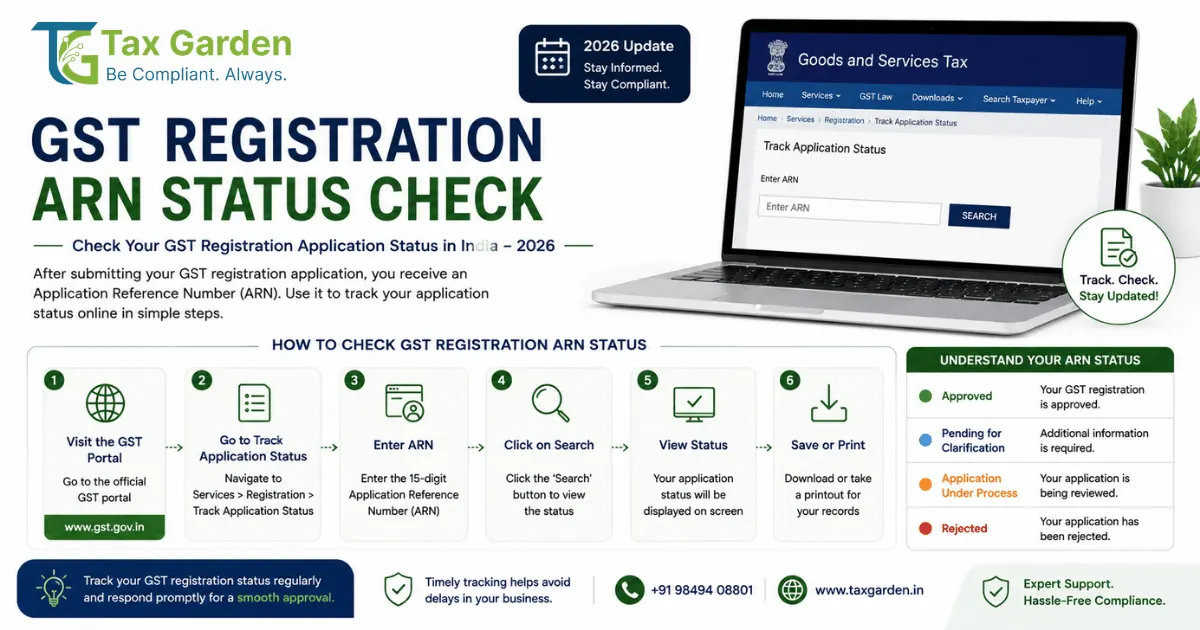
When you submit a GST registration application on gst.gov.in, the portal generates an Application Reference Number (ARN). This is your tracking key until the officer either approves or rejects the application. Every applicant who has completed Part A and Part B of Form GST REG-01 receives an ARN, and the wait between submission and GSTIN allotment is where most confusion happens.
This guide explains what each ARN status means, how to check it, how long the process takes, and what to do if something goes wrong.
What Is an ARN in GST?
Featured Snippet: An ARN (Application Reference Number) is a 15-character alphanumeric code generated by the GST portal when you successfully submit Form GST REG-01 and complete mobile and email OTP verification. Format: AA/SSSS/YYYYYYY (two-letter state code, four-digit zone code, seven-digit serial number). You receive it via SMS and email. Use it to track your registration status at gst.gov.in under Services > Track Application Status. The ARN remains valid until a final decision (approval or rejection) is issued.
The ARN is not your GSTIN. It is a temporary reference that handles the portal accepted your application. The GST Identification Number (GSTIN) is issued only after the proper officer approves the application, and it replaces the ARN as your permanent identifier.
ARN Format
The ARN follows a standard structure:
You will find the ARN in the acknowledgment displayed on screen after submission and in the confirmation SMS and email sent to your registered mobile and email address.
How to Check GST ARN Status
You can check your application status with or without logging in to the GST portal.
Post-Login Method
If you already have GST portal credentials (from a previous registration or a Temporary Reference Number):
- Log in at gst.gov.in with your username and password.
- Go to Services > Track Application Status.
- Select Module: Registration.
- Enter the ARN and click Search.
The post-login view may show additional details like the officer's name and office jurisdiction.
Using TRN (Temporary Reference Number)
If you saved a draft application but have not yet submitted Part B, you have a TRN instead of an ARN. A TRN tracks a draft, not a submitted application. To check TRN status, select "Login using TRN" on the registration page, enter the TRN and OTP, and continue editing or submit the application to generate an ARN.
What Each ARN Status Means
After you search by ARN, the portal shows one of these statuses:
Timeline: ARN to GSTIN
The processing time depends on your application's risk profile and whether Aadhaar authentication was completed.
Auto-Approval Under Rule 14A
Rule 14A of the CGST Rules (effective from November 1, 2025) introduced a dual-track processing system. Applicants identified as low-risk through the portal's data analysis receive automatic approval within 3 working days if the assigned officer does not act within that window. This applies to Aadhaar-authenticated applicants with a clean compliance history.
If you completed Aadhaar authentication during registration and your status still shows "Pending for Processing" after 7 working days, file a grievance on the GST portal under Services > User Services > Grievance/Complaint.
What to Do If Your Application Is Rejected (REG-05)
A rejection is issued in Form GST REG-05. The order states the reasons, which typically include: documents not matching (name on PAN versus business registration), address proof rejected, business activity description too vague, or failure to respond to REG-03 within the deadline.
You have two options:
Option 1: File a Fresh Application
There is no mandatory waiting period after rejection. You can submit a new Form GST REG-01 immediately with corrected documents. This is the faster route when the rejection was due to a fixable document issue.
Before reapplying:
- Read the REG-05 order carefully. Fix every issue it mentions.
- Get a fresh electricity bill or rent agreement if the address proof was rejected.
- If there was a name mismatch, get the underlying document (PAN, Aadhaar, or incorporation certificate) corrected first.
Option 2: Appeal Under Section 107
If you believe the rejection was incorrect and the officer ignored valid documents you submitted, you can appeal:
- Deadline: Within 3 months of the REG-05 order date (extendable by 1 month by the appellate authority).
- Where: On the GST portal under Services > User Services > My Applications > Appeal to Appellate Authority > Order Type: Registration Order.
- Attach: The REG-05 rejection order, a detailed written explanation, and all supporting documents.
Appeals are appropriate when the officer rejected despite a proper REG-04 reply. In practice, reapplying with corrected documents is faster than the appeal process for most applicants.
After Approval: Downloading Your GST Certificate
Once status shows "Approved," the portal sends your GSTIN and login credentials (User ID and temporary password) to your registered email. To download the certificate:
- Log in to gst.gov.in with the credentials from the approval email.
- Go to Services > User Services > View/Download Certificates.
- Download Form GST REG-06, which is your GST registration certificate.
The certificate shows your GSTIN, legal name, trade name, principal place of business, effective date of registration, and the type of registration (Regular, Composition, or Casual).
Verify Your GSTIN
After receiving your GSTIN, verify it is correctly reflected in the public database:
- Go to gst.gov.in > Search Taxpayer > Search by GSTIN/UIN.
- Enter the 15-digit GSTIN.
- Confirm your business name, address, registration date, and status show as "Active."
This verification is important when sharing your GSTIN with suppliers and customers, because they will check it before accepting your invoices for ITC claims.
Common Issues and Fixes
ARN not received after submission: Check your registered email's spam folder. If not found, go to Services > Track Application Status and search using your PAN instead of ARN. The portal also shows applications submitted against a PAN.
Status stuck on "Pending for Processing" beyond 7 days: File a grievance via the GST portal (Services > User Services > Grievance/Complaint). Include your ARN, submission date, and a screenshot of the status page. You can also contact the GST helpdesk at 1800-103-4786 (toll-free).
REG-03 received but cannot see it on portal: Log in using TRN or the credentials provided during Part A registration. Go to Services > Registration > Application for Filing Clarification. The REG-03 notice and reply option appear here.
"Validation Error" when checking ARN: Ensure you are entering the ARN exactly as received, no spaces before or after, correct case. If the ARN contains special characters, copy it from the original SMS or email.
For related reading, see our guides on GST registration process, how to reply to REG-03 notices, and GST registration cancellation and revocation.
Source attribution: Based on Rule 8, Rule 9, Rule 14A of the CGST Rules, 2017, Sections 22, 24, 25, and 107 of the CGST Act, 2017, and procedural guides on gst.gov.in and tutorial.gst.gov.in. Provisions cited are current as of June 2026. Verify applicable amendments with a qualified tax professional.